THE PRICE
Know what was agreed.
Keep accepted quote details and manually recorded deposits in view.
How CarveDraft works
Follow one fictional cabin-sign job through actual CarveDraft screens: customer context, the agreed quote, approved artwork and the production handoff.
01 / Know what needs attention
Today brings work that needs attention into one queue. Open the job or customer to see the history behind it, then choose your next step.
Buyer messages are sent by you. CarveDraft does not send them automatically.

Maya's Pine Ridge cabin sign is the example throughout this tour.
02 / Quote and approve with context
Build a quote from your price book or enter a manual unit price. Keep quote versions and the customer's artwork decision with the exact job they belong to.
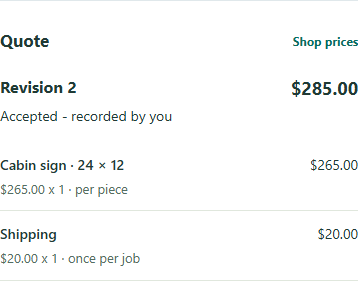
Keep accepted quote details and manually recorded deposits in view.
Maya approved version one: a 24 × 12 inch walnut sign. The decision stays tied to that artwork and its specifications.

Actual screens for the same fictional $285 cabin-sign job. You share proof links yourself.
03 / Finish and understand the job
Move the sign through production and record its delivery. Keep payments and material use alongside the work, so the record still makes sense when the next job comes in.
Payments are recorded manually. Materials-only margin excludes labor, overhead and other expenses.

Pine Ridge cabin sign: $30 in recorded materials against the $285 accepted quote.
Keep the work connected
Request early access for your shop. Your details are saved privately for CarveDraft to review.
No account, trial or charge starts with your request. No automatic launch email is sent.